


DreamBoard is an alternative interface customization for jailbroken iPhones. DreamBoard seems to be best known for making your iPhone look more like Android. As the best alternative to WinterBoard, DreamBoard offers some elegance that adds widget like interfacing to your home screen, replacing the nothing but tiles appearance we typically expect from an iOS device. We brings you tips and tricks to help you get the most use out of your jailbroken iOS device each week.
NB : thoses themes requires a Jailbroken iPhone 4, you will purchase them via Cydia, but adding next source will helps you to Get them for free :D
Installing methods (Choose one) :
1# From your >>JAILBROKEN<< iDevice (Requires Wi-Fi Connection):
-->Open Cydia
-->Manage
-->Sources
-->Edit
-->Add
-->http://repo.insanelyi.com/
-->Add any way
-->Enjoy !
* When it finishes choose your favorite themes then click on search, insert the name of your favorite one, then you will get it.
2# From your computer :
-->Download your favorite theme from links below
-->Run iFunbox and connect your iOS device via the USB cable to the PC.
-->Once the device is seen connected, click Raw File System and find the folder named Dreamboard
as shown below .

-->Now copy the theme (extract if compressed) to the Dreamboard Folder. Be careful that the folder you’re copying contains the theme files inside of the parent folder. For example if, OS7 contains another folder by the name of OS7, copy the later one.
-->Once you’ve done copying the files, simply run Dreamboard and you will see the themes in the panel
Here we show you the best ones :
# Boxor HD : (Download / 43MB)

Creator: falcon212
>> Note : 8/ 10<< According to the Theme's official page, this dreamboard theme will make you spend less time on your iPhone or iPod Touch with features such as Live Weather, WebWidget, Rotating RSS feeds reader, Wallpaper Switcher, and PhotoLive Box.
# iNav HD : (Download / 125MB)

Creator: Reeco
>> Note : 7/ 10<< This comes with the iNavHD beta 1.5 DreamBoard Port, a WinterBoard Version to go with the DreamBoard Port for the Full UI Experience, and the Original iNavHD Beta 1.5. An alternative keyboard is also included.
# Seven OS (Download / 5MB):

Creator: K.Nitsua and Zausser
>> Note : 8.5/ 10<< Features :
>> Note : 8.5/ 10<< Features :
- 4 categories : Games, Apps, Config, Media
- App grid with all your apps
- Choose between 4 wallpapers
- Nice and fluid animations
- Set your location directly in the theme for the weather
# AppleWEB HD V2 :

>> Note : 7/ 10<< * Toggle on and off the time/date under the Navbar by clicking the small apple in the upper left of the theme home page.
* The settings panel ('Theme Settings' button in the upper right of the themes home page) now is only used to set your zipcode and select the default weather app that launches when you click the weather tile.
* The Upper dock now slides left to right to accomedate more choices! The Phone, Messages, Navigation, Clock , Twitter and YouTube can ALSO scroll up and down independantly to show additional choices.


>> Note : 7.5/ 10<< While there is an Android look alike theme available by default in Dreamboard by the name of Endroid, the HTC HD2 theme is a few steps ahead. With a scrolling dockbar that can house whatever icons you choose to place on it, this theme can make accessing your app convenient and clutter free. Animated Weather and customizable wallpapers are part of the package as well.


* The settings panel ('Theme Settings' button in the upper right of the themes home page) now is only used to set your zipcode and select the default weather app that launches when you click the weather tile.
* The Upper dock now slides left to right to accomedate more choices! The Phone, Messages, Navigation, Clock , Twitter and YouTube can ALSO scroll up and down independantly to show additional choices.
# ErgoHD :

Creator: TheWarlu
>> Note : 7/ 10<< As the author claims, this particular Dreamboard theme is created so that you will only operate your device with a single hand. ErgoHD allows you to quickly access your apps.
# Gyro HD (Download / 13MB):
Creator: JoeyBoren
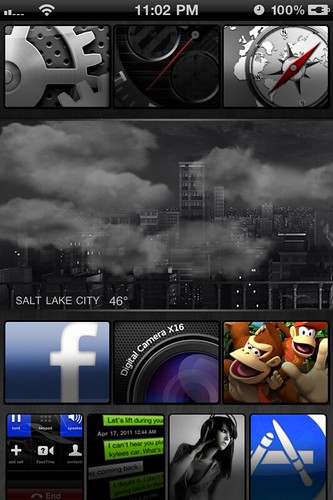
>> Note : 6.5/ 10<< This is an original theme complete with features like optional day and night changing wallpaper, scrolling pages and four editable tabs (Favs, Apps, games, and Cydia).
>> Note : 6.5/ 10<< This is an original theme complete with features like optional day and night changing wallpaper, scrolling pages and four editable tabs (Favs, Apps, games, and Cydia).
# OS7 (Download / 1MB) :

>> Note : 6.5/ 10<< OS7 gives you the Pin and Unpin options so you can place your favorite or most used app on the homescreen and even move them up and down in order. An overall very slick and simple theme which looks brilliant on the Retina display.
# HTC HD2 (Downlaod / 40MB) :

>> Note : 7.5/ 10<< While there is an Android look alike theme available by default in Dreamboard by the name of Endroid, the HTC HD2 theme is a few steps ahead. With a scrolling dockbar that can house whatever icons you choose to place on it, this theme can make accessing your app convenient and clutter free. Animated Weather and customizable wallpapers are part of the package as well.
# ISimple :
>> Note : 8/10<< It looks nice, and it got a new style of theming different from many other themes, and you will find sweet icons and widgets.
# Apple Desk Port V2 (Download / 46MB):

>> Note : 8.5/10<< This theme is not really practical to be honest, but is fun if you get the hang of it. It mimics you physical desk space and attempts to mimic the OSX as well, of course does not function like one incase you got too excited.
T o B e C o n t i n u e d . . .


